E Commerce Main AndroidApp
Dart
E Commerce Main AndroidApp
Two Flutter e-commerce apps: a Firebase storefront, and a peer-to-peer marketplace with bidding, chat and a JWT REST API.
Preview
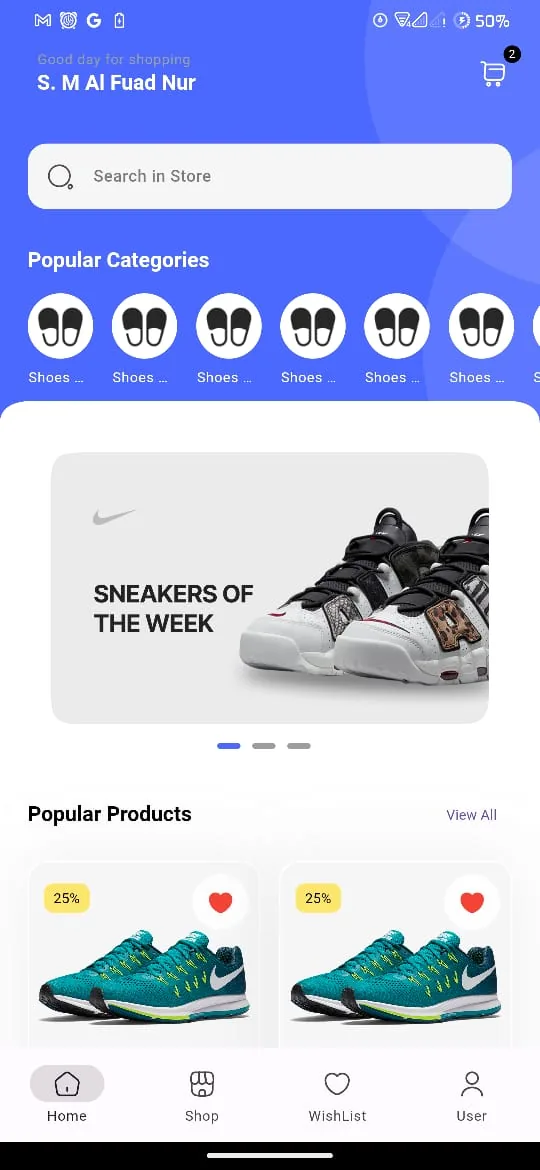
A real screenshot taken from the app, included in the project repository.
What this demonstrates
- Primary language: Dart (86.7%)
- Multi-language stack (9 languages)
- Last updated 4 months ago
Tech stack
Overview
E Commerce Main AndroidApp is an online storefront with product browsing and a shopping experience, also serving as a cross-platform mobile application. It is built primarily with Dart, C++, CMake. Two Flutter e-commerce apps: a Firebase storefront, and a peer-to-peer marketplace with bidding, chat and a JWT REST API..
Project README
E-Commerce Android App (Flutter)
This repository holds two independent Flutter e-commerce applications. They are not modules of a single app — each has its own pubspec.yaml, its own package name, and its own build. Pick one and run it on its own.
e_commerce_v1 | e_commerce_v2 | |
|---|---|---|
| Package | e_commerce | test_project |
| What it is | Classic storefront — browse, cart, checkout, orders | Peer-to-peer marketplace with bidding, selling, and chat |
| Backend | Firebase | Custom REST API (Dio + JWT) |
| Architecture | Feature-first (screens + controllers) | Clean Architecture (data / domain / presentation) |
| State management | GetX | GetX |
| Dart SDK | >=3.0.6 <4.0.0 | ^3.11.0 |
| Theming | Light + dark | Light only |
| Status | Feature-complete UI | UI complete, backend partially wired |
| Platforms | Android, iOS, Web | Android, iOS, Web, Linux, macOS, Windows |
Prerequisites
- Flutter SDK (v2 needs Dart 3.11+, so use a recent stable channel)
- Android Studio or Xcode for device/emulator targets
- Run
flutter doctorand clear any blockers before starting
e_commerce_v1 — Firebase storefront
A full shopping app with a polished UI in both light and dark mode. 118 Dart files, 60 screenshots.
Stack: GetX (state, routing, DI) · GetStorage (local persistence) · Firebase Core · Iconsax · Lottie · carousel_slider · flutter_native_splash
Features: onboarding carousel · email login / signup / password reset · home feed with banners and categories · store, brands, and sub-category browsing · product details with reviews and ratings · cart · checkout with payment method selection · order history · wishlist · profile, settings, and address management
Layout:
lib/
├── common/       # Shared widgets (appbar, product cards, shapes, loaders)
├── data/         # Repositories — currently authentication only
├── features/
│   ├── authentication/    # Onboarding, login, signup, password reset
│   ├── personalization/   # Profile, settings, addresses
│   └── shop/              # Home, store, product, cart, checkout, orders, wishlist
└── utils/        # Theme, constants, validators, formatters, helpers, popups
Setup
cd e_commerce_v1
flutter pub get
flutter run
Firebase config files (android/app/google-services.json, ios/Runner/GoogleService-Info.plist, lib/firebase_options.dart) are committed, so it builds against the existing Firebase project as-is. To point it at your own Firebase project instead, install the FlutterFire CLI and run flutterfire configure from inside e_commerce_v1/, which regenerates all three.
Note: app startup is gated on Firebase initializing.
AuthenticationRepository.screenRedirect()reads anisFirstTimeflag from GetStorage and sends you to onboarding on first launch, or to login afterwards. If Firebase fails to initialize, the app sits on a loading spinner rather than erroring visibly.
Screenshots
All 60 light/dark screenshots are catalogued in e_commerce_v1/README.md.
e_commerce_v2 — REST marketplace with bidding
A newer rebuild on a different premise: users both buy and sell, and products are bid on rather than simply added to a cart. Structured with Clean Architecture throughout.
Stack: GetX (state, routing, bindings) · Dio (HTTP, with a JWT interceptor) · flutter_dotenv (config) · SharedPreferences (token storage) · animated_bottom_navigation_bar · carousel_slider · otp_text_field · page_transition
Features: animated splash and onboarding · sign in / sign up / forgot password with OTP verification and password reset · home feed and category browsing · product detail with bidding · post an item for sale · items you're selling · items you've bought or bid on · direct chat and inbox · wishlist · notifications · language selection · profile and public profile view
Layout — every feature follows the same three-layer split:
lib/
├── core/
│   ├── binding/     # Global DI
│   ├── constants/   # API endpoints, colors, assets, strings
│   ├── network/     # Dio client + auth interceptor
│   ├── routes/      # Route names and GetPage table
│   └── themes/
└── features/<name>/
    ├── data/          # Models, remote datasources, repository impls
    ├── domain/        # Entities, repository contracts, use cases
    └── presentation/  # Bindings, controllers, views, widgets
Setup
cd e_commerce_v2
flutter pub get
Create a .env file in e_commerce_v2/ before running. It is declared as an asset in pubspec.yaml and loaded in main(), so the app will not start without it. .env is gitignored, so it does not ship with the repo:
API_URL=http://your-api-host:5000
If API_URL is unset, ApiConstant falls back to http://localhost:5000. Then:
flutter run
Expected backend
The app talks to a REST API exposing these routes (see lib/core/constants/api_constant.dart):
| Method | Endpoint | Purpose |
|---|---|---|
POST | /auth/register | Sign up |
POST | /auth/login | Sign in — returns the JWT |
POST | /auth/forgot-password | Request a reset |
POST | /auth/reset-password | Complete a reset |
GET | /auth/me | Current user |
GET | /category/allCategories | Category list |
On login the token is written to SharedPreferences under auth_token; the Dio interceptor then attaches it as Authorization: Bearer <token> on every subsequent request.
Implementation status
Only auth and home have their data/ and domain/ layers implemented and wired to the API. The other fourteen features — product, category, chat, inbox, wishlist, sell_items, bought_bid_items, add_product, notifications, profile, view_profile, language, onboarding, bottom_nav — have their folder scaffolding and a working presentation layer, but no datasources or use cases yet. They render against placeholder data. That scaffolding is the intended shape for filling them in.
Contributing
Please read CODE_OF_CONDUCT.md before opening a pull request. Keep changes scoped to a single app — the two do not share code.
License
MIT — see LICENSE.